
Autobattle
Your character fights the monsters you chose and picks up their loot. You tick whom to fight — then the autobattle finds a target, fights and collects the loot by itself.
How to open it
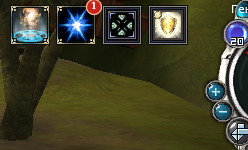
The "Autobattle" button is the third in the row of buttons left of the radar.
How to start it
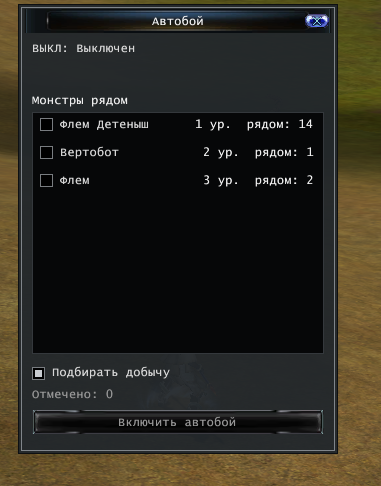
- The "Monsters nearby" list shows the monsters around you: name, level and "near: N" — how many are close. Those you see but far away are marked "far".
- Tick the ones to fight. You can tick several kinds.
- If you like — "Pick up loot".
- Press "Start autobattle".
The bottom shows how many kinds are ticked. To change the choice, stop the autobattle first.
How it works
- The hunting zone. On start the autobattle remembers where the ticked monsters stand and keeps your character inside that circle. Walk farther and it goes back to the zone; no monsters — it waits until they appear.
- One target at a time, and only the ticked monsters.
- The top of the window shows what it is doing: looking for a target, fighting, picking up loot, going back to the zone, waiting for monsters. Below — how many it killed and picked up.
Loot
- It picks up only from monsters killed by the autobattle. What other players throw away is left alone.
- With the «Collector's Amulet» (auto-loot) the loot goes to the bag or the cloud by itself.
- If the bag is full, picking up pauses and the fight goes on.
When it stops
- With the "Stop autobattle" button.
- By itself — if your character dies or ends up far from the hunting zone, for example after a teleport.